How to Use Claude Code: A Beginner's Tutorial (No Coding Needed)

By Tuan Hoang, Founder of Flowmaps
Published · 6 min read
To use Claude Code, get a paid Claude plan (Pro is $20 a month), install the Claude desktop app, open its Code tab, pick a folder for your project and describe what you want to build in plain words. Claude Code writes the files, runs them and tells you what it did. Build one small feature at a time, try each one yourself, and keep a written plan so it knows what comes next.
You don't need to know how to code. You do need to know what you want, and you need to be willing to read what Claude tells you before you say yes. This guide walks you through it from zero. Everything here comes from Anthropic's own Claude Code docs and pricing page (checked October 2026).
What is Claude Code?
Claude Code is Anthropic's AI coding agent. Unlike a chat, it works inside a folder on your computer: it can read your files, create new ones, run commands and test what it built. You talk to it like you would to a developer sitting next to you: "Add a sign-up page", "This button doesn't work, fix it".
That's the big difference with browser builders like Lovable or Bolt. Those host everything for you. Claude Code builds a real project on your own computer that you own completely, which you can later put online wherever you like.
What does Claude Code cost?
Claude Code is included in every paid Claude plan. It isn't available on the free plan.
| Plan | Price | Good for |
|---|---|---|
| Pro | $20/month ($17/month billed yearly) | Your first app and side projects |
| Max | from $100/month | Building every day, bigger projects |
Each plan has usage limits that reset over time. If you hit the limit, you wait or upgrade; you're never billed extra by surprise. Start with Pro.
Where you can use it
Claude Code runs in several places. They all use the same engine, so pick the one that feels least scary:
- The Claude desktop app (Mac and Windows). Easiest for beginners: click the Code tab, choose a folder, and type. No terminal needed.
- VS Code or Cursor, as an extension. Good if you already use one of those editors.
- The terminal. The full version, for people who are comfortable with a command line.
- The web at claude.ai/code, for projects that live on GitHub.
How to install Claude Code
The easy way (recommended): download the Claude desktop app, sign in with your paid account, and click the Code tab (the </> icon). It includes Claude Code, so there's nothing else to install.
The terminal way: open a terminal and paste the command for your system.
On Mac or Linux:
curl -fsSL https://claude.ai/install.sh | bash
On Windows (PowerShell):
irm https://claude.ai/install.ps1 | iex
Then open a new terminal window, go to your project folder and start it:
cd my-app
claude
The first time, it asks you to sign in. On Windows, Anthropic recommends also installing Git for Windows.
Your first project, step by step
- Make an empty folder, for example Documents/my-app. Claude Code fills it with your app.
- Open it in Claude Code: in the desktop app, click Code and choose the folder.
- Describe the app in a few sentences. Who it's for, what they can do, and what the first version needs. Not everything you can think of: the first version.
- Ask for one feature, not the whole app. Start with the basics: "Set up the project and make a home page that says what the app does."
- Read what it plans to do and say yes. Claude Code asks before it runs commands or changes things. If something sounds odd, ask "Why?". It will explain.
- Try it yourself. Ask "How do I open this in my browser?" and click around. Found something wrong? Describe what you see.
- Say yes when it offers to use git. Git keeps a history of every change, so you can always go back to a version that worked.
- Next feature. Same folder, next step.
How to give Claude Code good instructions
Claude Code is very capable, but it only knows what you tell it. These habits make the biggest difference:
- One feature per request. "Add login with email" works. "Build my whole marketplace" gets you a lot of half-working code.
- Say what "done" means. "Done when a new user can sign up, gets an email, and lands on their dashboard."
- Describe problems, don't diagnose them. "When I click Save, nothing happens" beats a guess about what's broken.
- Write your rules down once. Claude Code reads a file called
CLAUDE.mdin your project at the start of every session. Ask it to make one with your app's purpose and your preferences ("plain English in the app", "keep it simple"). - Keep a plan outside the chat. Conversations end; a plan stays. Know which features you're building and in which order, so every session picks up where the last one stopped.
See also how to write prompts for AI app builders.
Plan first, then let Claude Code build
The hardest part of building with Claude Code isn't the code. It's knowing what to build next, and in what order, so your fifth feature doesn't break your second.
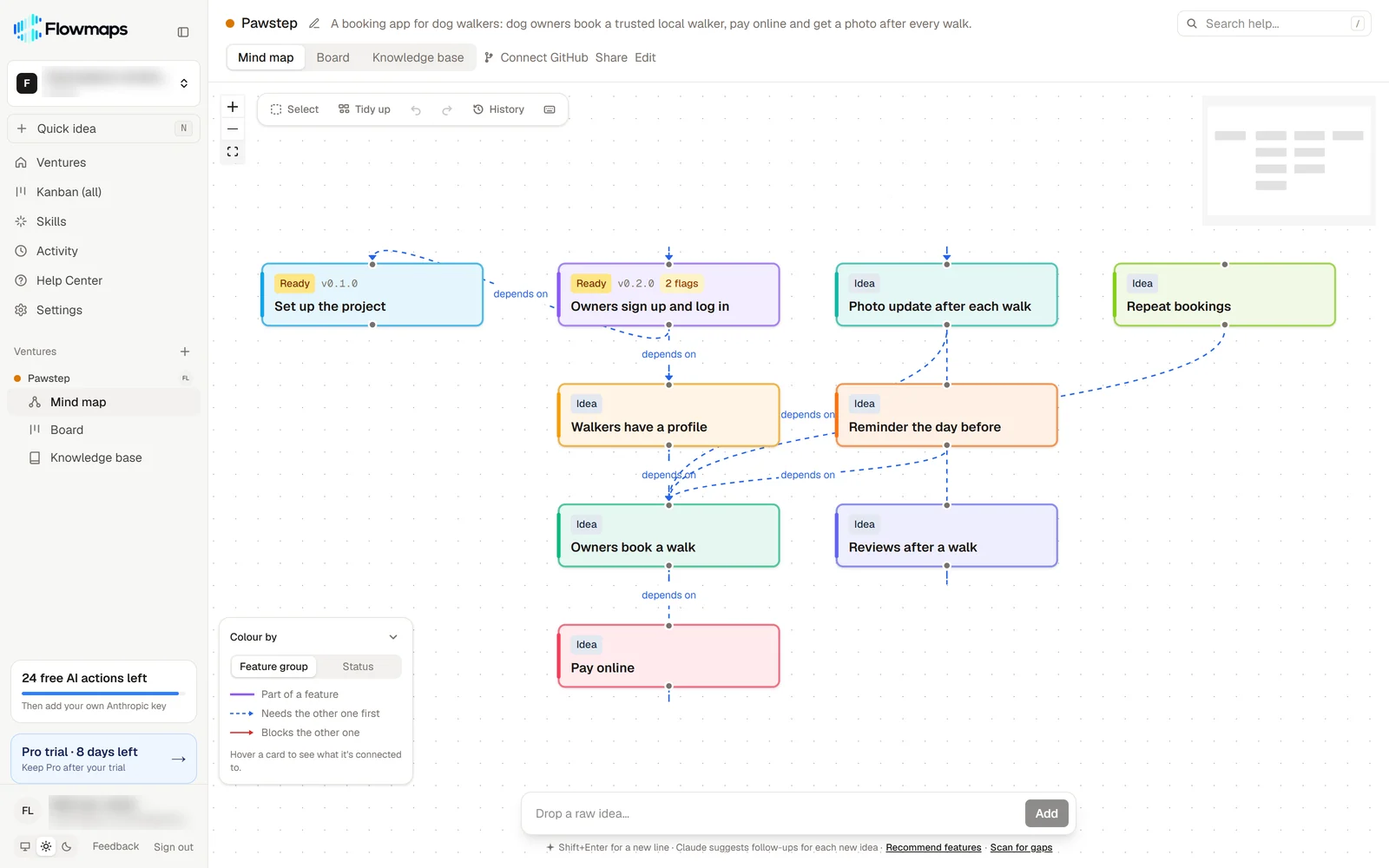
That's what Flowmaps is for. You describe your idea once and it maps the features in build order (setup and logins first, the core feature next, extras later), with build instructions for each one. Then you connect Flowmaps to Claude Code once and simply ask:
"What can I build from Flowmaps?"
Claude Code reads the next feature's instructions, moves the card to In Progress while it builds, and to Shipped when you've tried it and said it works. A week later you open your board and see exactly where you were.
Common beginner mistakes
- Asking for everything at once. The result looks impressive for five minutes and then nothing quite works.
- Saying yes without reading. You don't need to understand the code, but read what it says it's about to do.
- Never testing. Click through every feature before you ask for the next one.
- Starting a new folder for every attempt. Keep one project and improve it; git lets you undo.
- No plan. Without one, every session starts from scratch and you end up rebuilding the same things.
Frequently asked questions
Is Claude Code free?
No. It's included in Claude's paid plans, starting with Pro at $20 a month. The free Claude plan doesn't include it.
Do I need to know how to code to use Claude Code?
No. You describe what you want in plain words and Claude Code writes the code. It helps to learn a few basics along the way, like opening your app in the browser and what git does, and Claude Code will explain those if you ask.
Do I need to use the terminal?
No. The Claude desktop app has Claude Code built in (the Code tab), so you can use it without ever opening a terminal.
What's the difference between Claude and Claude Code?
Claude (the chat app) talks with you. Claude Code works in a folder on your computer: it creates and edits files, runs your app and tests it. Plan in the chat, build in Claude Code.
Is Claude Code better than Cursor?
They're built for different people. Claude Code is an agent you give tasks to; Cursor is a code editor with AI inside it. See Cursor vs Claude Code for a full comparison.
Ready to start? Look at an example plan, or read how to plan an app before you build it with AI.