Flowmaps vs ChatPRD: Which One Fits How You Build?

By Tuan Hoang, Founder of Flowmaps
Published · 5 min read
ChatPRD writes product documents: it turns an idea into a polished PRD that you share with a team or hand to a coding tool. Flowmaps turns an idea into a visual map of features in build order and gives each feature its own build prompt, then tracks which ones are built. Pick ChatPRD if you think in documents and work in a product team. Pick Flowmaps if you build the app yourself with an AI builder, one feature at a time.
Both are good tools, and they solve different problems. I make Flowmaps, so I'm biased; I've tried to keep this fair, and every fact about ChatPRD below comes from their own website (checked October 2026).
The short version
| Flowmaps | ChatPRD | |
|---|---|---|
| What you get | A mind map and board of features in build order, with a build prompt per feature | A written PRD and other product documents |
| Best for | Solo founders and beginners building with Lovable, Bolt, Cursor or Claude Code | Product managers and product teams |
| Visual | Yes: mind map plus a Kanban board | No: documents and chat |
| Tracks what's built | Yes: cards move from Idea to Shipped, also when you merge on GitHub | No build status |
| Hands work to your AI builder | One prompt per feature; Claude Code builds a card through MCP | Opens documents in v0, Cursor, Lovable and Replit; MCP and API on Pro |
| Free plan | 1 venture, up to 30 cards | 3 chats, limited length, basic model |
| Paid from | Pro $19/month ($12/month early bird) | Pro $15/month ($179/year) |
| Team plan | $49/month for 5 people | $29 per seat/month |
| AI | Your own Anthropic key (new accounts get free AI actions to try it) | Included in the plan |
What ChatPRD does well
ChatPRD calls itself an AI product manager. You describe a feature or a product, and it drafts a PRD: goals, scope, user stories, success metrics and open questions. It can pull context from tools like Notion, Linear and GitHub, review a document with scorecards, and keep project knowledge in one place.
It's built for teams. The Teams plan adds a shared workspace, real-time collaboration on documents and search across Atlassian, Google Drive, Microsoft Teams and SharePoint. It's SOC 2 Type II certified, which matters if you work in a bigger company. ChatPRD says more than 250,000 product managers use it.
If your job is to write specs that other people build, or you need a document to share with a team, investors or a client, ChatPRD is strong at exactly that.
What Flowmaps does differently
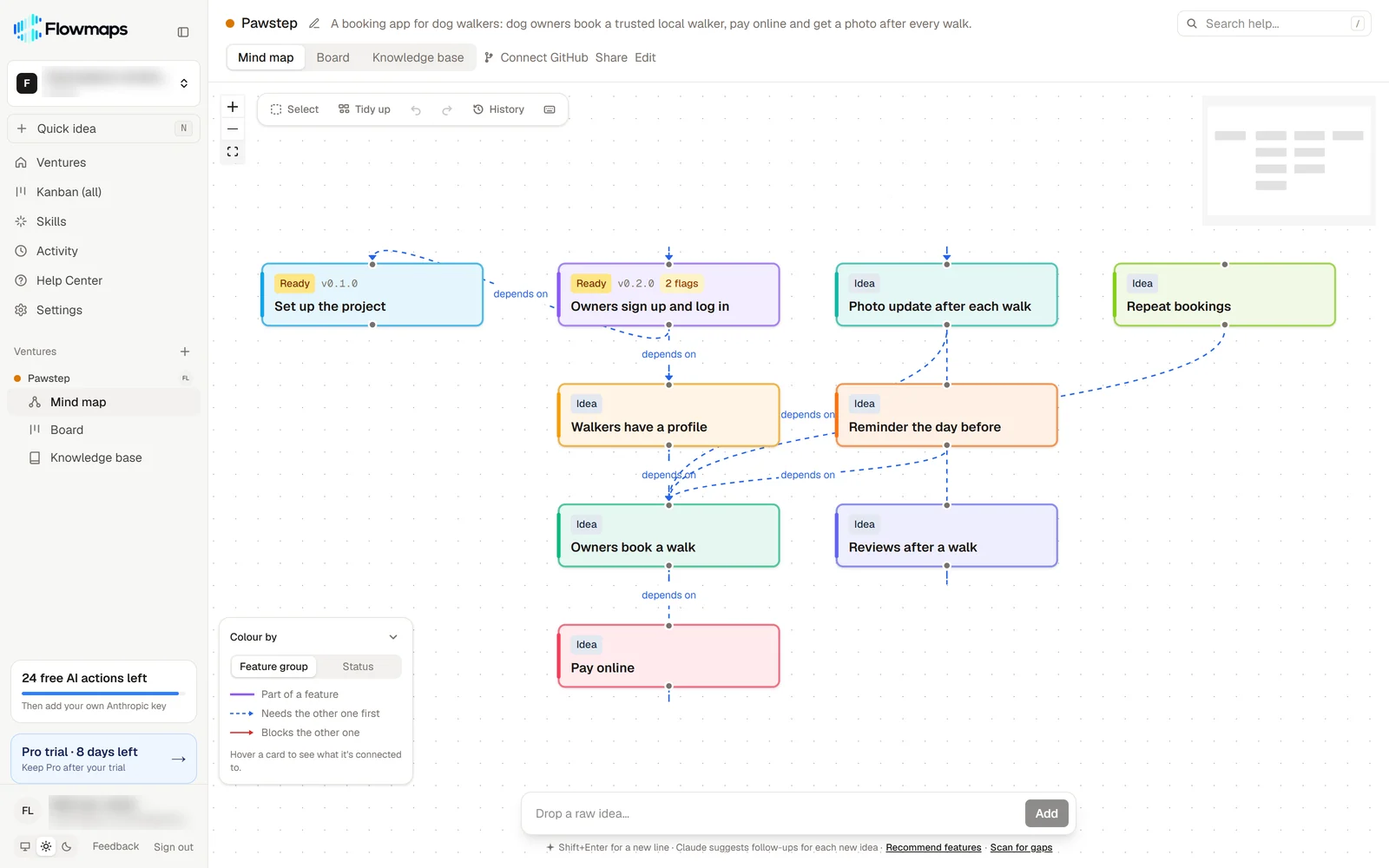
Flowmaps starts from the same idea, but it doesn't stop at a document. It breaks your app into features and lays them out as a map, in the order they need to be built: setup and logins first, the core feature next, payments and extras after that. Lines show which feature depends on which.
Each feature then gets its own build prompt, split into database, backend and frontend, written for the builder you use.
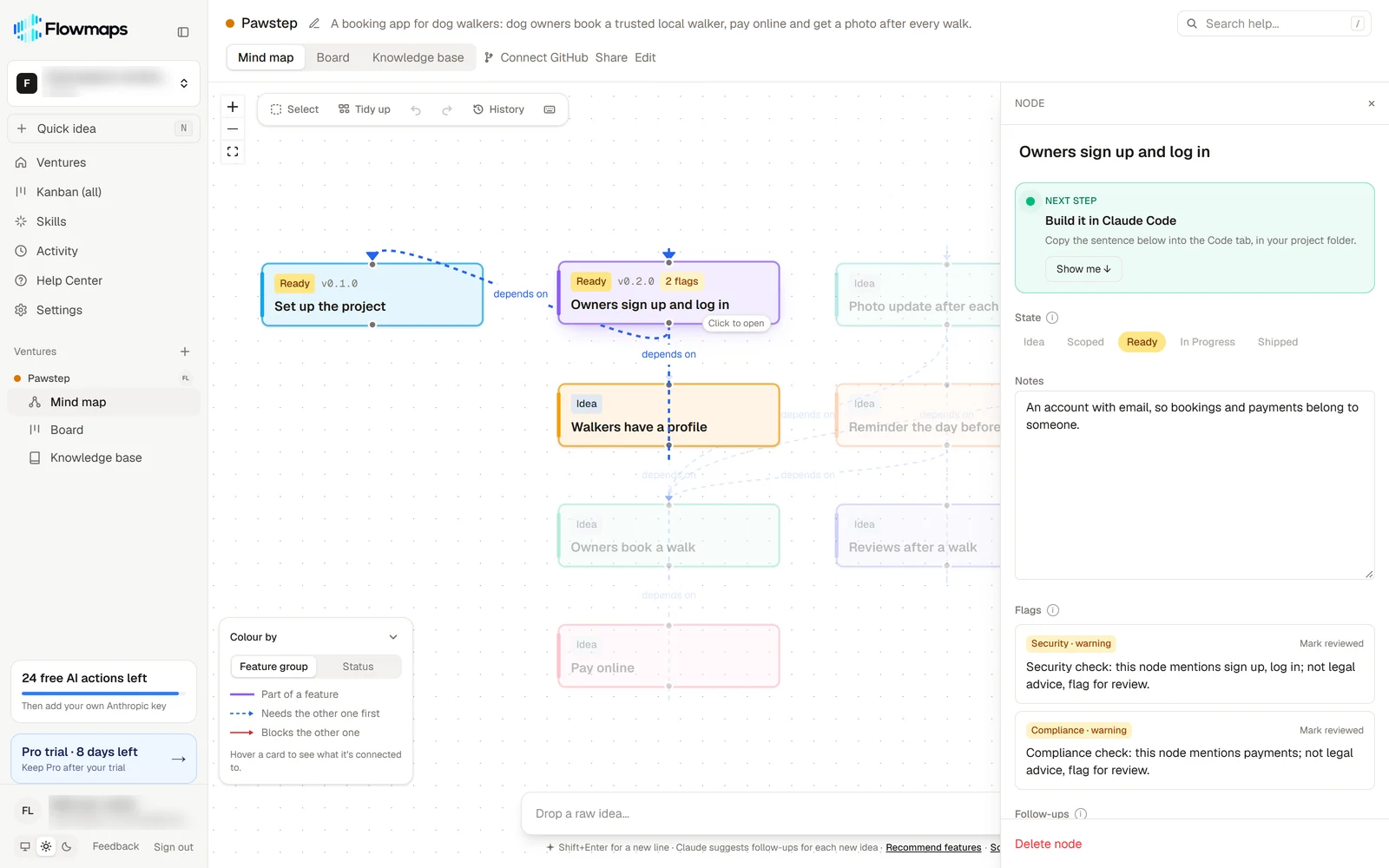 You build one card at a time. Cards move across the board (Idea, Scoped, Ready, In Progress, Shipped), so a week later you can open the board and see exactly where you were.
Two things make it different in practice:
- It stays with your project. One map per app, kept up to date as you build, instead of a document that's finished once it's written. That helps most when you run more than one project.
- It's made for people who aren't developers. Plain words, a sensible default at every step, and it points out what beginners tend to forget, like what happens when a payment fails.
Where each one falls short
ChatPRD focuses on documents. There's no board or build status that moves as features ship, so keeping track of what's built is up to you. It's also written for product managers; if you've never written a PRD, the format can feel like a lot.
Flowmaps isn't a document tool. If you need a long, formal PRD to share with a team or a client, ChatPRD (or a template) does that better. Flowmaps also uses your own Anthropic key for the AI, which is cheaper per action but is one more step to set up after the free actions run out.
Which one should you pick?
- You're building your first app with Lovable, Bolt, Replit or v0: Flowmaps. You'll get a clear order and one prompt per step, instead of one big prompt.
- You build with Claude Code or Cursor and run several side projects: Flowmaps, for one map per project that remembers where you were.
- You're a product manager writing specs for a team: ChatPRD.
- You need a polished PRD to share with investors, a client or developers: ChatPRD, or start from a PRD template.
- Both: some people write the PRD in ChatPRD, then paste it into Flowmaps to turn it into features in build order. That works fine.
Frequently asked questions
Is Flowmaps a ChatPRD alternative?
For people who build the app themselves with AI, yes. Both turn an idea into a plan. ChatPRD's plan is a document; Flowmaps' plan is a map of features with a build prompt for each one, and it tracks what's built.
Which one is cheaper?
ChatPRD Pro is $15 a month with the AI included. Flowmaps Pro is $19 a month ($12 for early-bird customers), and you pay Anthropic directly for the AI you use with your own key. Both have a free plan to try them.
Can I use both?
Yes. Write or refine a PRD in ChatPRD, then paste it into Flowmaps as your idea. Flowmaps turns it into features in build order and writes a build prompt per feature.
Do they work with Claude Code?
Both do. ChatPRD's hosted MCP server (Pro and Teams) lets Claude Code read your documents. With Flowmaps, Claude Code can list your Ready features, read a feature's build prompts and move the card on your board as it builds.
If you want to see how Flowmaps plans an app, look at an example map, or read how to plan an app before you build it with AI. For a wider comparison, see the best AI app planning tools. Also compare Flowmaps vs Taskmaster and Flowmaps vs Buildpad.