Cursor vs Claude Code: Which One Should You Use in 2026?

By Tuan Hoang, Founder of Flowmaps
Published · 5 min read
Cursor is a code editor with AI built in: you see your code and the AI helps you write and change it. Claude Code is an AI agent: you describe a task and it does the work in your project, from editing files to running and testing them. Pick Cursor if you want to watch and edit the code yourself. Pick Claude Code if you'd rather hand over whole features and review the result. You can also use both: Claude Code runs inside Cursor as an extension.
I make Flowmaps, which works with both, so I don't have a horse in this race. Facts below come from Cursor's pricing page, Claude's pricing page and the Claude Code docs, checked October 2026.
The short version
| Cursor | Claude Code | |
|---|---|---|
| What it is | A code editor (based on VS Code) with an AI agent inside | An AI coding agent that works in your project |
| Made by | Anysphere, owned by SpaceX since August 2026 | Anthropic, the makers of Claude |
| How you work | You see the code; the AI suggests and edits | You give a task; it plans, edits, runs and tests |
| Where it runs | The Cursor app; also web, mobile and cloud agents | Desktop app, terminal, VS Code, Cursor, JetBrains, web |
| AI models | Grok models; Claude and others on Premium and up, at API prices | Claude models |
| Free plan | Yes, with limited requests | No; needs a paid Claude plan |
| Paid from | $8/month (Plus, Grok models only) | $20/month (Claude Pro) |
| Best for | People who want to read and edit the code | Beginners and builders who hand over whole features |
How Cursor works
Cursor looks like a normal code editor: your files on the left, the code in the middle, an AI chat on the side. Its agent can search your project, edit several files and run commands, and it suggests code as you type. You stay close to the code the whole time, which is great if you want to learn or keep control.
The big news of 2026: SpaceX bought Cursor (the deal closed on 14 August 2026), and it's now part of the same AI team as Grok. Since October, new subscriptions are sold as The X Subscription, shared with Grok:
- Free: limited agent and chat requests.
- Plus, $8/month: a shared usage pool, Grok models only.
- Premium, $30/month: more usage, the latest Grok models, cloud agents and AI code reviews, plus third-party models (like Claude) at API list price, billed separately.
- Super, $100/month and Ultra, $200/month: much more usage.
Existing Cursor subscribers keep their old plan unless they switch. If you want Claude models inside Cursor, you now need Premium or higher and pay for that use on top.
How Claude Code works
Claude Code doesn't ask you to look at code at all, unless you want to. You open a project folder, describe what you want ("Add a booking calendar where owners pick a time"), and it works out a plan, edits the files, runs the app and fixes what breaks. It asks before it runs commands, so you stay in charge.
It runs in a lot of places: the Code tab of the Claude desktop app (the easiest start), the terminal, VS Code, JetBrains, the web, and even inside Cursor as an extension. It's included in Claude's paid plans: Pro at $20/month ($17 billed yearly) or Max from $100/month. There's no free version.
New to it? Read how to use Claude Code, a step-by-step tutorial for beginners.
Where each one falls short
Cursor shows you everything, and that can be a lot if you've never seen code. Since the move to the X Subscription, the cheapest plan only has Grok models, and using Claude costs extra on Premium. Pricing has changed several times, so check the current plans before you commit.
Claude Code has no free plan, and on Pro you can run into usage limits on busy days. Because it does so much on its own, it's easy to let it run without checking the result. And you only get Anthropic's models.
Which one should you pick?
- You've never coded and want to build an app: Claude Code in the Claude desktop app. You describe, it builds, you test.
- You want to learn to code, or like to see every change: Cursor.
- You want Claude models and the lowest cost: Claude Code on Pro ($20) is cheaper than Claude in Cursor (Premium at $30 plus API prices).
- You want a free start: Cursor's free plan.
- You already use Cursor: add the Claude Code extension and use both. Cursor for small edits, Claude Code for whole features.
Whichever you pick, plan first
Both tools build what you ask for. Neither one decides what your app needs, or in which order to build it. That's where most AI-built apps go wrong: a login added after the payments, a database redone three times.
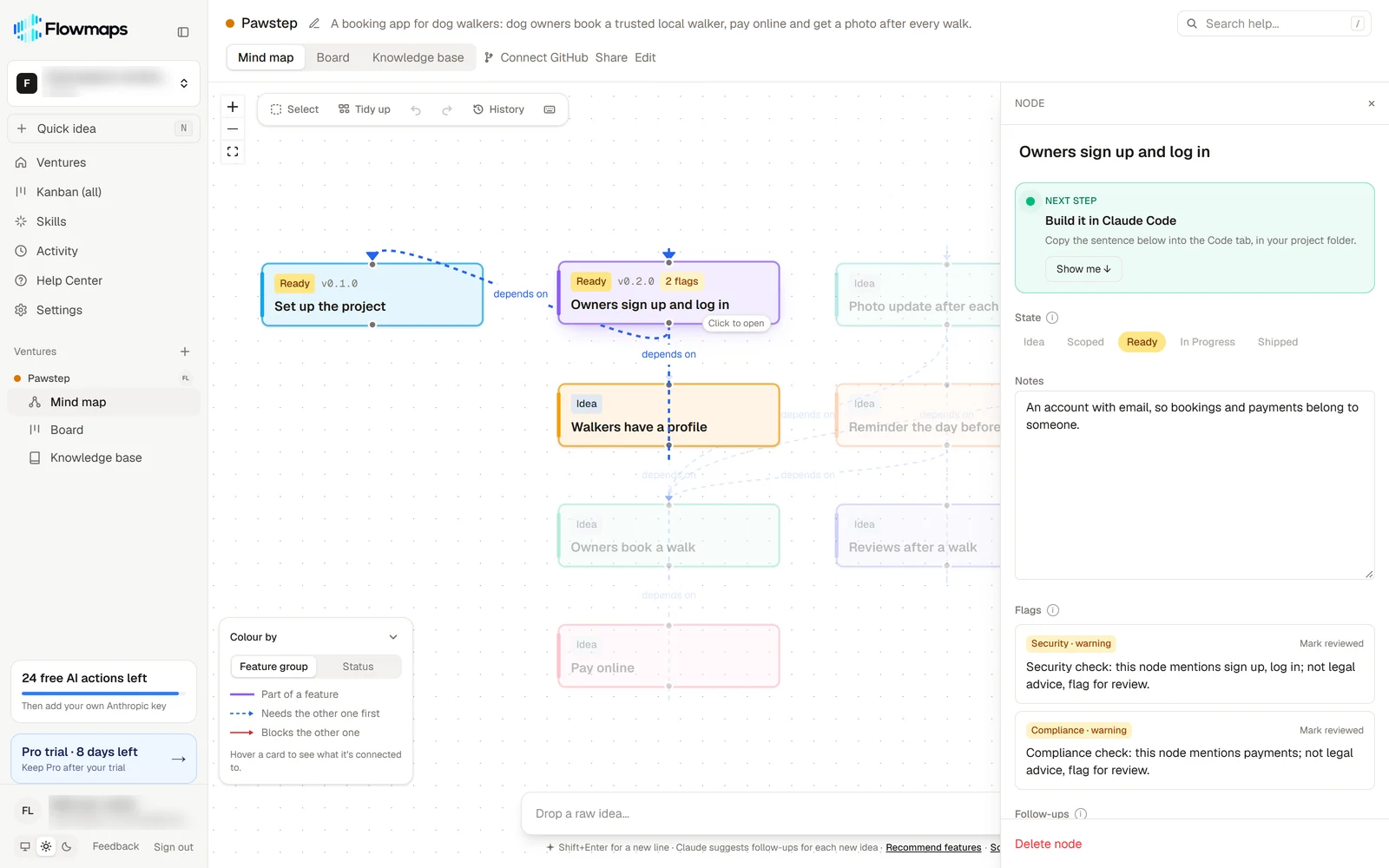
Flowmaps turns your idea into a map of features in build order, with build instructions for each one. With Claude Code it connects directly: ask "What can I build from Flowmaps?" and it builds the next feature and moves its card on your board. With Cursor, you copy the build prompt for a feature into Cursor's agent.
Frequently asked questions
Is Cursor better than Claude Code?
Neither is better for everyone. Cursor suits people who want to work in the code. Claude Code suits people who want to describe a task and review the result. Many developers use both.
Can I use Claude in Cursor?
Yes, on Cursor's Premium plan and higher, where third-party models like Claude are available at API list price, billed on top of the plan. You can also install the Claude Code extension in Cursor and use it with your Claude plan.
Which is cheaper, Cursor or Claude Code?
Cursor starts lower: free, or $8 a month for Plus with Grok models only. Claude Code starts at $20 a month with Claude Pro. If you specifically want Claude models, Claude Code is usually cheaper.
Who owns Cursor now?
SpaceX. It bought Anysphere, the company behind Cursor, in a deal that closed on 14 August 2026. Cursor now works with xAI's Grok team and is sold through the X Subscription.
Which is better for beginners?
Claude Code, in the Claude desktop app. You don't have to read or touch code, and it explains what it's doing in plain words. Start with our Claude Code tutorial.
More comparisons: the best vibe coding tools and the best AI app planning tools.