Flowmaps vs Taskmaster: Visual Planner or Terminal Task List?

By Tuan Hoang, Founder of Flowmaps
Published · 4 min read
Taskmaster turns a PRD into a task list for your AI coding agent, and it lives in the terminal. Flowmaps turns an idea into a visual map of features in build order, with a build prompt per feature, and it lives in the browser. Both give your agent one clear step at a time instead of one huge prompt. Pick Taskmaster if you're a developer who likes the command line. Pick Flowmaps if you'd rather see your plan, or you don't code yourself.
I make Flowmaps, so I'm biased. Everything about Taskmaster below comes from its own pages and GitHub (checked October 2026).
The short version
| Flowmaps | Taskmaster | |
|---|---|---|
| What it is | A visual planner in the browser | An open-source CLI and MCP server |
| Starts from | One sentence about your idea (or a pasted PRD) | A PRD file |
| What you get | A mind map and board of features in build order, with a build prompt per feature | A task list with subtasks, dependencies and complexity scores |
| Best for | Beginners and solo founders building with Lovable, Bolt, Cursor or Claude Code | Developers working in Claude Code, Cursor or Windsurf |
| Needs a terminal | No (Claude Code is optional) | Yes |
| Status tracking | Cards move to Shipped by themselves when you merge on GitHub | You or the agent update each task's status |
| Price | Free plan (1 venture, 30 cards); Pro $19/month ($12 early bird) | Free and open source; Hamster's team layer from $40 per creator/month |
| AI | Your own Anthropic key (new accounts get free AI actions) | Your own key, with 15+ AI providers including local models |
What Taskmaster does well
Taskmaster (also called Task Master AI) takes a product requirements document and breaks it into tasks, splits the complex ones into subtasks, scores how hard each one is and works out which tasks depend on which. Your agent then asks it what to do next (tm next) and works through the list.
It's a favourite with developers: about 28,000 stars on GitHub. It runs as a command-line tool and as an MCP server inside Claude Code, Cursor, Windsurf and others, and it works with many AI providers, including local models. The core is free and open source. It's now part of Hamster, whose paid Team plan ($40 per creator a month) adds shared briefs, cloud agents and two-way sync with Linear and Jira.
If you already live in the terminal and want a structured task list right next to your code, Taskmaster is excellent.
What Flowmaps does differently
Flowmaps doesn't need a PRD to start. You describe your app in a sentence and it suggests the features, including the ones beginners forget, like what happens when a payment fails. You see them as a map: setup and logins first, the core feature next, extras later, with lines showing what depends on what.
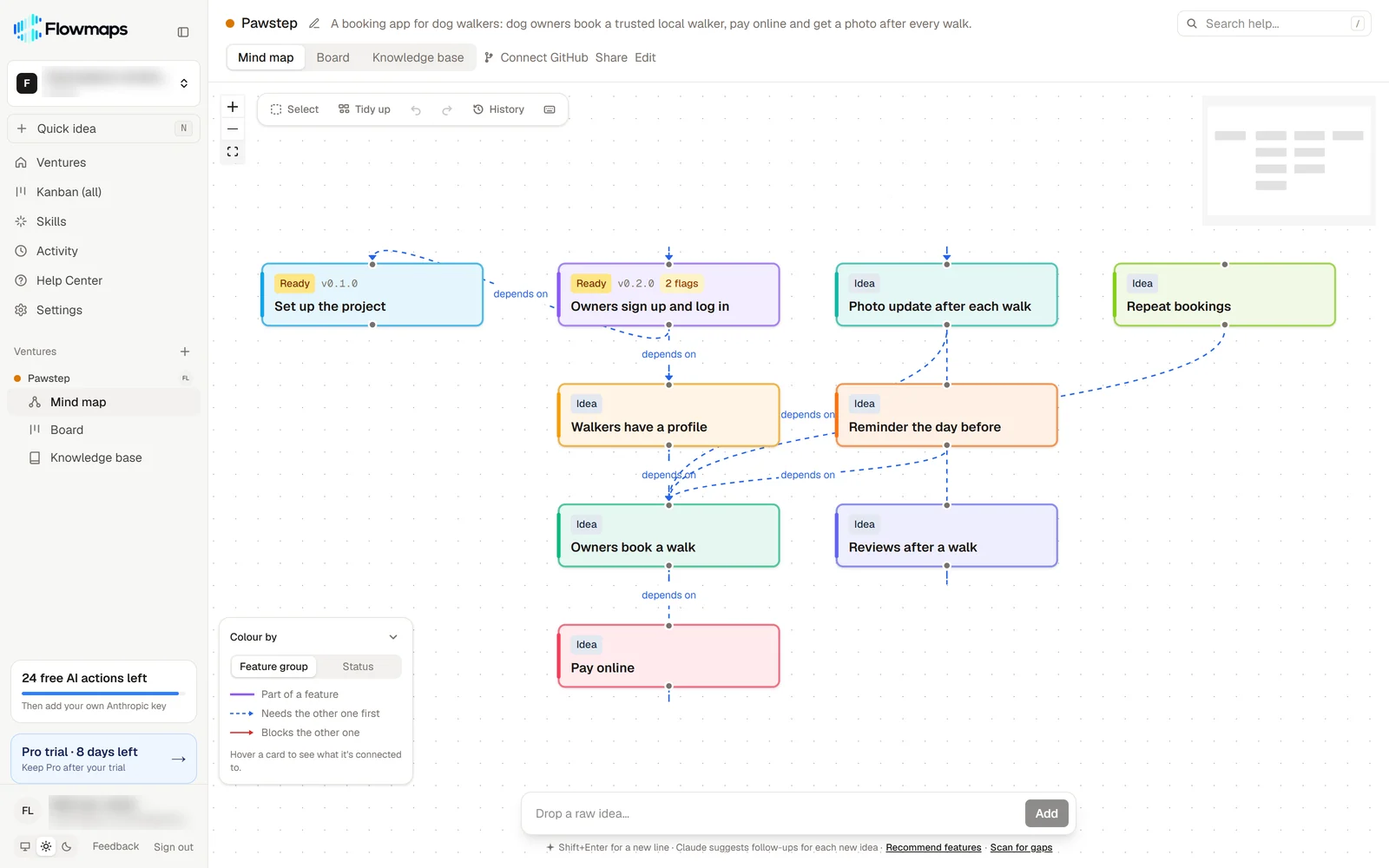
Each feature gets its own build prompt (database, backend, frontend) for the builder you use, whether that's Lovable, Bolt, Replit, Cursor or Claude Code. Cards move across a board from Idea to Shipped. If you connect GitHub, a card moves to Shipped when its branch is merged, so the board stays right without you updating it.
Where each one falls short
Taskmaster needs the terminal and a PRD to begin with. That's no problem for developers, but beginners will find the setup technical. Task statuses aren't tied to your code or git, so the list is only as current as its last update.
Flowmaps is less configurable than a CLI. If you want to choose any AI model, run it fully local, or script your planning in the terminal, Taskmaster gives you more control. Flowmaps uses Anthropic's models through your own key.
Which one should you pick?
- You don't code, and you build with Lovable, Bolt, Replit or v0: Flowmaps. No terminal, no PRD needed.
- You're a developer in Claude Code or Cursor and love the command line: Taskmaster.
- You run several side projects and want to see where each one stands: Flowmaps, with one map per project.
- You want a free, open-source tool you can run with local models: Taskmaster.
- Your team plans in Linear or Jira: Taskmaster with Hamster's Team plan syncs with both.
Frequently asked questions
Is Flowmaps a Taskmaster alternative?
Yes, for people who'd rather plan visually in the browser. Both turn an app into ordered steps for an AI agent. Taskmaster gives you a task list in the terminal; Flowmaps gives you a map and a board, with a build prompt per feature.
Do I need a PRD for either?
Taskmaster starts from a PRD. Flowmaps can start from one sentence about your idea; if you already have a PRD, you can paste it in as your idea.
Do they both work with Claude Code?
Yes. Taskmaster runs as an MCP server inside Claude Code. Flowmaps connects to Claude Code too: you say "Build this feature from Flowmaps" and Claude reads the build prompts and moves the card as it works.
Which one is free?
Taskmaster's core is free and open source. Flowmaps has a free plan with one venture and up to 30 cards; Pro is $19 a month.
Curious how a plan looks in Flowmaps? See an example map, or compare more tools in the best AI app planning tools. Also see Flowmaps vs ChatPRD.